Table of Contents
Notes on the software design of the herbivore model from a programmer’s perspective.
- Todo:
- Encourage to do refactoring of the architecture if it supports modularity and flexibility.
Overview
The megafauna model aims to apply principles of object-oriented programming as much as possible (see the page Object-oriented Programming). Its architecture is modular and extensible. Each part can be tested in unit tests.
The following UML diagram shows through which interfaces the megafauna model interacts with other components:
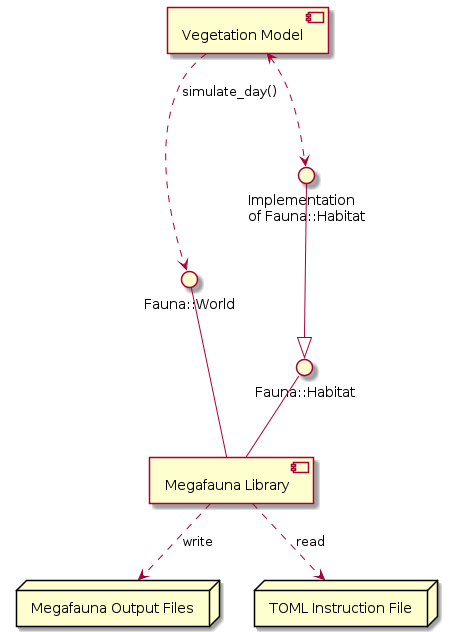
The Modular Megafauna Model was originally within the code base of the LPJ-GUESS ecosystem model. In 2019 it was separated into its own library for the following reasons:
- Model is reusable with other vegetation models.
- Model can be better tested in isolation and with continuous integration (CI).
- More freedom to structure the repository and its documentation.
- The model can be licensed and distributed independently from LPJ-GUESS.
- Memory leaks can be found more easily since they are not mingled with LPJ-GUESS.
Simulation Design
The basic simulation design is simple:
- Herbivores (Fauna::HerbivoreInterface) are independent entities that interact with their environment.
- Each herbivore lives in a habitat (Fauna::Habitat), grouped in populations (Fauna::PopulationInterface). In LPJ-GUESS this would correspond to a plant
Individualgrowing in aPatch. - Fauna::World is the framework class running the simulation.
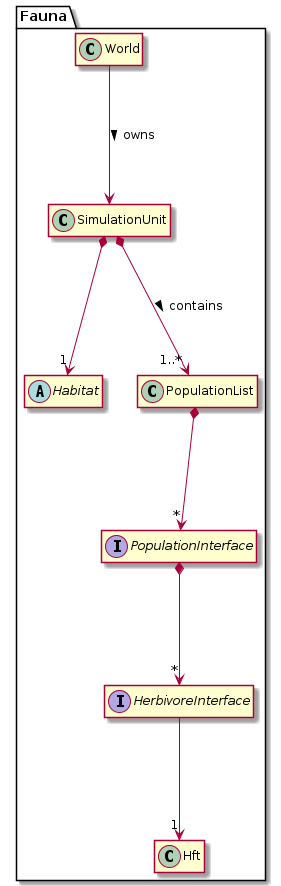
All interactions between herbivores and their environment happen through Fauna::Habitat. The herbivores don’t feed themselves and don’t have any direct connection to the habitat. Instead, they are assigned their forage. With each simulated day (Fauna::HerbivoreInterface::simulate_day()), it is calculated, how much forage they would like to consume (Fauna::HerbivoreInterface::get_forage_demands()). Based on all forage demands, the forage is distributed with a user-specified forage distribution algorithm (Fauna::DistributeForage). Then they can eat their portion (Fauna::HerbivoreInterface::eat()). This approach follows the Inversion of Control Principle.
Similarly, the Habitat does not interact with the herbivores either. It does not even know about the herbivore populations, as it is capsuled in Fauna::SimulationUnit.
Forage Classes
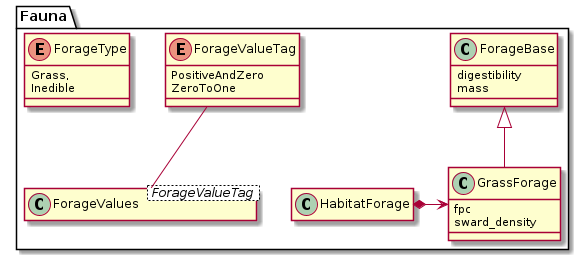
The model is designed to make implementation of multiple types of forage (like grass, browse, moss, etc.) easy. Each forage type is listed in Fauna::ForageType. The global constant Fauna::FORAGE_TYPES holds all entries of this enum so that it’s easy to iterate over them.
The template class Fauna::ForageValues serves as a multi-purpose container for any forage-specific values. Many arithmetic operators are defined to perform calculations over all forage types at once. For any specific use of the class, a semantic typedef is defined, e.g. Fauna::ForageMass or Fauna::Digestibility. This helps to directly see in the code what a variable contains.
Forage types need to have specific model properties. Grass, for instance, has the property sward density, which would not make sense for leaves of trees. Therefore, a second set of forage classes is defined with one class for each forage type. All these classes inherit from Fauna::ForageBase.
Any forage properties are defined by the habitat implementation in Fauna::Habitat::get_available_forage(). They can be used for example in algorithms of:
- forage distribution (Fauna::DistributeForage),
- diet composition (Fauna::GetForageDemands::get_diet_composition),
- digestion limits (Fauna::GetForageDemands::get_max_digestion), or
- foraging limits (Fauna::GetForageDemands::get_max_foraging).
- See also
- How to add a new forage type
The Herbivore
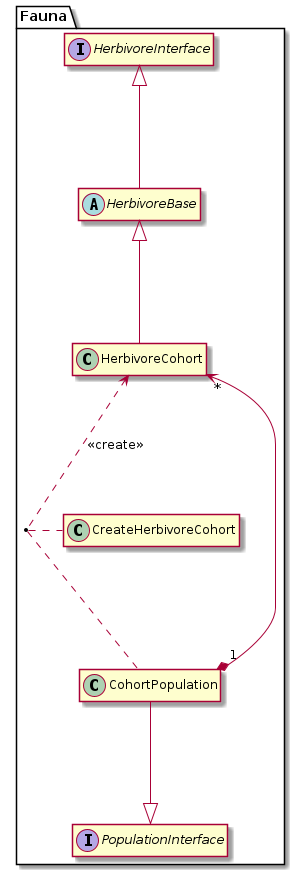
The simulation framework can operate with any class that implements Fauna::HerbivoreInterface (compare Liskov’s Substitution Principle). Which class to choose is defined by the instruction file parameter Fauna::Parameters::herbivore_type.
Currently, only one herbivore class is implemented: Fauna::HerbivoreCohort. The herbivore model performs calculations generally per area and not per individual. The area size of a habitat is undefined.
- See also
- How to add a new herbivore class
HerbivoreBase
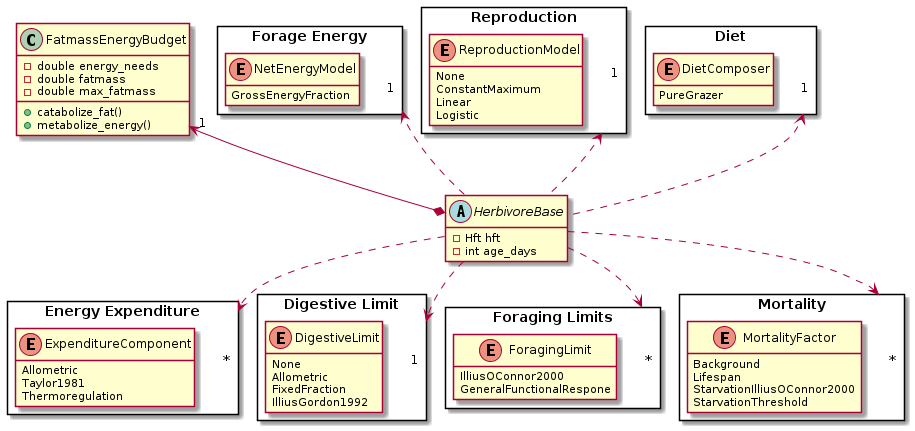
The herbivore class itself can be seen as a mere framework (compare Inversion of Control) that integrates various components:
- Each herbivore is of one Herbivore Functional Type (HFT): Fauna::Hft
- The herbivore’s own energy budget: Fauna::FatmassEnergyBudget.
- Its energy needs, defined by Fauna::Hft::expenditure_components. The herbivore object is self-responsible to call the implementation of the given expenditure models. (A strategy pattern would not work here as different expenditure models need to know different variables.)
- How much the herbivore is able to digest is limited by a single algorithm defined in Fauna::Hft::digestion_limit.
- How much the herbivore is able to forage can be constrained by various factors which are defined as a set of Fauna::Hft::foraging_limits.
- The diet composition (i.e. feeding preferences in a scenario with multiple forage types) is controlled by a the model selected in Fauna::Hft::foraging_diet_composer, whose implementation should be called in Fauna::GetForageDemands::get_diet_composition().
- How much net energy the herbivore is able to gain from feeding on forage is calculated by a selected net energy model: Fauna::NetEnergyModel. (given by constructor injection).
- Death of herbivores is controlled by a set of Fauna::Hft::mortality_factors. For a cohort that means that the density is proportionally reduced. The corresponding population objects will release dead herbivore objects automatically.
Populations
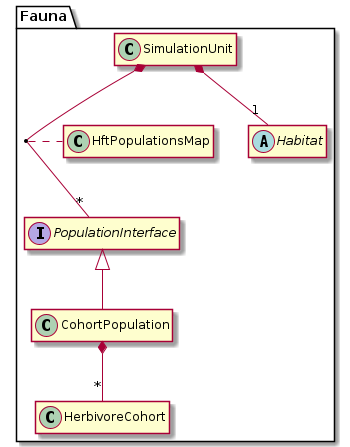
Each herbivore class needs a specific population class, implementing Fauna::PopulationInterface, which manages a list of class instances of the same HFT. Each habitat (Fauna::Habitat) is populated by herbivores. The class Fauna::SimulationUnit contains a habitat and the herbivore populations (Fauna::PopulationList).
A herbivore population instantiates new herbivore objects in the function Fauna::PopulationInterface::establish(). For cohort herbivores, there is a simple helper class to construct new objects: Fauna::CreateHerbivoreCohort. The establish() function is called by the simulation framework (Fauna::World). In this design, the framework is only responsible for triggering the spawning of herbivores. How the reproduce and die is managed by the herbivore class itself, and the corresponding population and creator class.
Error Handling
Exceptions
The library uses the C++ standard library exceptions defined in <stdexcept>. All exceptions are derived from std::exception:
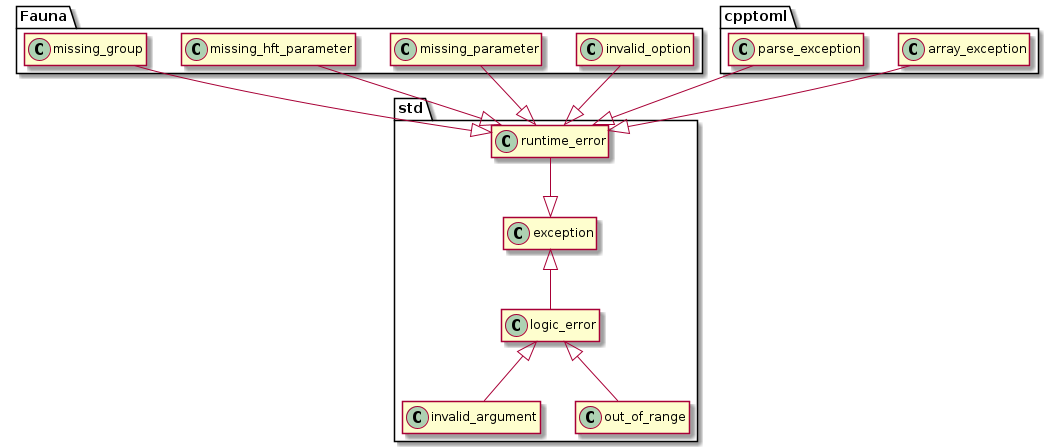
Any function that potentially creates an exception declares that in its doxygen description.
- Warning
- Beware that any function—unless documented otherwise—will not catch exceptions from calls to other functions. Therefore, even if a function does not announce a potential exception throw in its documentation, exceptions created in other functions can arise.
Exceptions are used…:
- …to check if the TOML instruction file is correct.
- …to check if parameters in public methods are valid.
- …to check the validity of variables coming from outside of the herbivory module where there are no contracts defined and ensured.
You throw an exception (in this case class std::invalid_argument) like this:
```cpp
if (/*error occurs/*)
    throw std::invalid_argument("My error message");
```
Each class makes no assumptions about the simulation framework (e.g. that parameters have been checked), but solely relies on the class contracts in the code documentation.
The megafauna library will never exit the program or print messages to STDERR or STDOUT. No exceptions arising in the library will be handled. The host program is responsible to handle exceptions from the library and to inform the user and halt the program.
Exception messages in the megafauna library should start with the fully qualified function name (including namespace) of the function that is creating the exception.
- Remarks
- If you debug with
gdband want to backtrace an exception, use the commandcatch throw. That forces gdb to stop at an exception, and then you can use the commandbacktraceto see the function stack.
Assertions
At appropriate places, assert() is called (defined in the standard library header <cassert>/assert.h). assert() calls are only expanded by the compiler if compilation happens for DEBUG mode; in RELEASE, they are completely ignored.
Assertions are used…:
- …within non-public methods to check within-class functionality.
- …to verify the result of an algorithm within a function.
- …in code regions that might be expanded later: An assert call serves as a reminder for the developer to implement all necessary dependencies.
Parameters
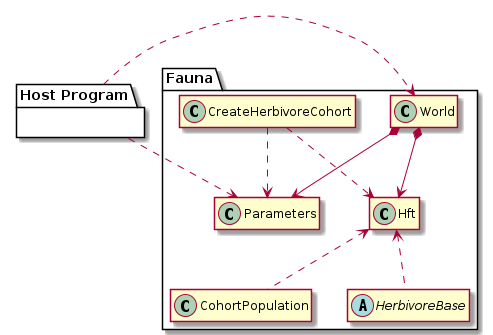
All user-defined simulation parameters are contained in the two classes Fauna::Hft and Fauna::Parameters. All parameters must be constant within one simulation run. Since some classes work with pointers to the classes Fauna::Hft and Fauna::Parameters, all objects of these classes must not be moved in memory. For that reason, std::shared_ptr is used in Fauna::HftList.
The host program only passes the path to the TOML instruction file to the class Fauna::World. The parameters are parsed by the megafauna library independently, using cpptoml. This is done by the class Fauna::InsfileReader.
The TOML format is chosen because it is easy to read for humans and easy to parse with a free library. Many people might be already familiar with similar syntax from DOS ini files. The table arrays are particularly useful for defining an HFT set. Alternative formats don’t have all these advantages. The YAML standard is a bit too complex for our purpose, but would have been another good candidate. JSON and XML are not so easy for humans to read and edit.
Following the Inversion of Control principle, as few classes as possible have direct access to the classes that hold the parameters. These classes play the role of the “framework”: They call any client classes only with the very necessary parameters instead of the complete Fauna::Hft or Fauna::Parameters objects. The following diagram gives an overview:
Output
Output Classes
Output classes within the herbivory module are collected in the namespace Fauna::Output.
- The two structs Fauna::Output::HabitatData and Fauna::Output::HerbivoreData are simple data containers.
- The struct Fauna::Output::CombinedData represents one datapoint (‘tupel’/‘observation’) of all output variables in space and time.
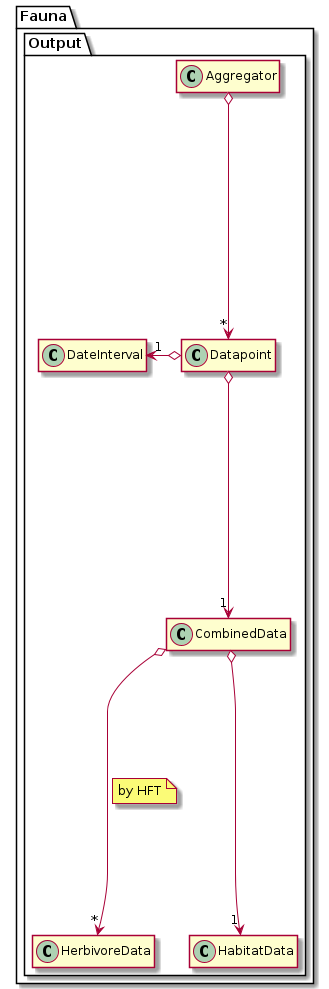
There are three levels of data aggregation:
1) Each day in Fauna::World::simulate_day(), a new set of output data (Fauna::Output::CombinedData) is created for each simulation unit. For this, the habitat data is taken as is, but the herbivore data is aggregated per HFT (see Fauna::Output::HerbivoreData::create_datapoint()). This level of aggregation is spatial within one habitat. Sums and averages are calculated. Any variables per habitat or per area are summed, for instance herbivore densities. Variables per individual are averaged, using individual density as weight.
2) The second level of aggregation happens also in Fauna::World::simulate_day(). The datapoint for that day is added to the temporal average in the Fauna::SimulationUnit object. This level of aggregation is therefore temporal across days.
3) The third level of aggregation takes place in Fauna::Output::Aggregator. Here, the accumulated temporal averages from the simulation units are combined in spatial aggregation units (Fauna::Output::Datapoint::aggregation_unit). This level of aggregation is therefore spatial across habitats.
For the latter two aggregation levels the function Fauna::Output::CombinedData::merge() is used.
- Note
- All time-dependent variables are always per day. For example, there is no such thing like forage eaten in one year. This way, all variables can be aggregated using the same algorithm, whether they are time-independent (like individual density) or represent a time-dependent rate (like mortality or eaten forage).
Pros and Cons of the Output Design
The pros of this design:
- Simplicity: There are only few classes.
- Separation of concerns: Each class (herbivores and habitats) is self-responsible for managing its own output, and the output data containers are self-responsible for aggregating their data.
- Diversity of data structures: There is no restriction in regards to data type for new member variables in the output containers (as long as they can be merged).
The cons of this design:
- Strong coupling: The output module is highly dependent on the data structure of the output containers.
- Rigidity of data containers: Ideally, the containers should be oblivious to the details of the data they hold.
- Lack of modularity: A submodule of, e.g. Fauna::HerbivoreBase cannot easily deliver its own output variable.
- Cumbersome extensibility: New output variables need to be introduced in various places (see How to add a new output variable). That is a violation of the Open/Closed Principle.
- Any variable that is specific to a submodule or interface implementation (e.g.
bodyfatis specific to Fauna::HerbivoreBase) will produce undefined values if that submodule is not active. The user is then responsible to interpret them as invalid or disable their output. So far, there is no check of congruency between parameters/HFT settings and the selection of output variables in the output module.
- Copyright
 This software documentation is licensed under a Creative Commons Attribution 4.0 International License.
- Date
- 2019